
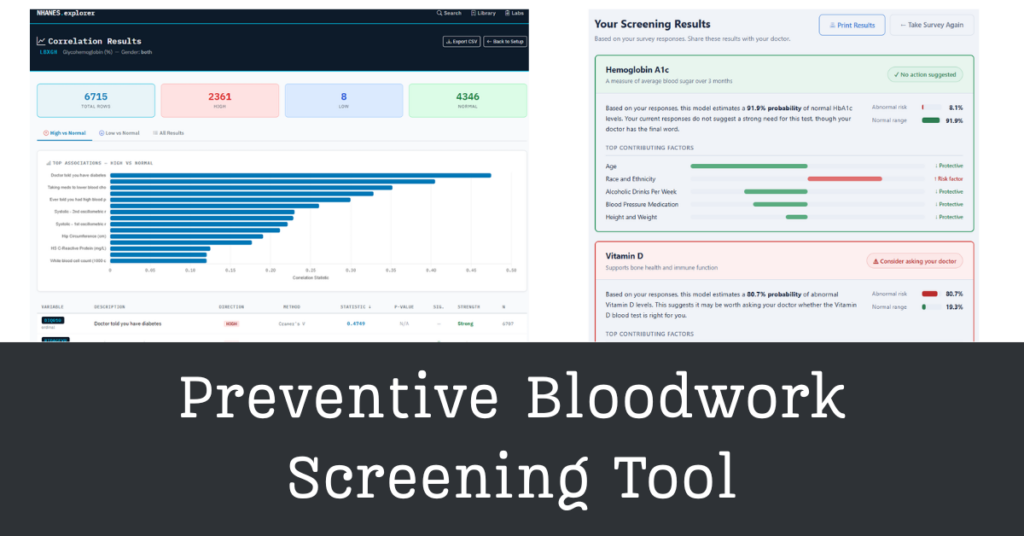
A machine learning web application that helps users identify which blood tests may be worth discussing with their doctor, based on lifestyle and health survey responses.
CHALLENGE
Many people unknowingly live with conditions that are detectable through routine bloodwork. Elevated HbA1c can be an early signal of prediabetes. Low Vitamin D is associated with weakened bones and impaired immune function. High hsCRP is a marker of systemic inflammation linked to cardiovascular risk.
The problem is that these tests are rarely ordered until symptoms appear, leaving a screening gap that could otherwise enable earlier intervention.
SOLUTION
Built a full-stack Django web application deployed on PythonAnywhere that guides users through a health and lifestyle survey and produces interpretable risk scores for five blood tests: hsCRP, HbA1c, Vitamin D, White Blood Cell Count, and HDL Cholesterol.
Users select which tests they want to screen for, answer a deduplicated set of plain-English survey questions drawn from the relevant models, and receive a results page that shows their probability of abnormal results, the top contributing factors behind each score, and a print-ready summary to bring to a doctor’s appointment.
Key Technologies: Python, Django, scikit-learn, NHANES (CDC), Logistic Regression, Boruta Feature Selection, KNN Imputation, PythonAnywhere
Live Application: dpsciarr.pythonanywhere.com
OUTCOME
The application deploys five independently trained logistic regression models, each achieving test AUC scores between 0.73 and 0.79 using only survey-based inputs.
The survey covers up to 29 unique questions depending on which tests are selected, with overlapping features (like BMI and age) appearing only once. Results are delivered with feature-level contribution scores so users understand not just their risk level, but which of their specific answers drove it. No user data is collected, stored, or transmitted at any point.
– TECHNICAL OVERVIEW –
Data and Modeling
All five models were trained on the 2021–2023 National Health and Nutrition Examination Survey (NHANES), a CDC dataset of approximately 7,587 participants with 128 features covering demographics, diet, lifestyle factors, physical examination data, and laboratory blood test results. The final dataset was used to train binary classifiers for each blood test, with abnormality thresholds defined by clinical reference ranges.
The modeling pipeline followed six steps for each target:
- Data Preparation: Filter relevant features, drop lab values that would not be available to a survey respondent, and engineer a binary target (normal vs. abnormal).
- Train/Test Split: 80/20 stratified split to preserve class balance in both sets.
- Preprocessing: One-hot encoding for categorical variables, StandardScaler for continuous variables, and KNN imputation for missing values.
- Feature Selection: Correlation-based filtering followed by Boruta, a random forest wrapper method that identifies confirmed and tentative features by comparing feature importances against random noise. This reduced each model from 90+ features to roughly 10 to 20.
- Model Training: Both a Balanced Random Forest and an Elastic Net Logistic Regression were trained for each target.
- Model Evaluation: Models were evaluated on test AUC, positive class recall, and the gap between train and test AUC as a measure of generalization.
Logistic regression was selected for deployment across all five models. While the Balanced Random Forest achieved marginally higher recall in some cases, the logistic regression consistently produced train-test AUC gaps near zero, indicating better generalization to new data. Its coefficients also translate directly into interpretable feature contributions, which is essential for showing users which survey answers drove their results.
Model Performance Summary
| Test | Test AUC | Train-Test Gap |
|---|---|---|
| HbA1c | 0.778 | -0.004 |
| hsCRP | 0.786 | -0.010 |
| HDL Cholesterol | 0.741 | 0.001 |
| Vitamin D | 0.732 | 0.005 |
| White Blood Cell Count | 0.741 | 0.007 |
The Key Challenge: Class Imbalance
Several targets were severely imbalanced. WBC abnormality, for example, affected only 9.1% of participants. Three strategies were combined to address this: stratified train/test splitting to preserve class ratios, class_weight="balanced" in the logistic regression to penalize misclassification of the minority class more heavily, and Boruta feature selection to avoid overfitting to noise features that appear predictive only due to class skew.
Handling Missing Features at Inference
Each model was trained on a different set of Boruta-confirmed features, several of which overlap across models (BMI and age appear in nearly all five). When a user selects only a subset of tests, their survey only includes questions relevant to those models. Features that the model expects but the survey did not ask for arrive as NaN values and are filled in by the KNN imputer using population averages from the training data. This is intentional: those features contribute based on what is typical in the NHANES population, which is a reasonable fallback for a screening tool.
The Inference Pipeline
Each model is serialized as a pkl bundle containing the Boruta-selected feature list, the fitted StandardScaler, the fitted KNNImputer, and the fitted LogisticRegression. The scaler and imputer are fit specifically on the Boruta-selected features using raw (pre-scaled) training data, which ensures that the transformation applied at inference time matches exactly what the model was trained on.
At request time, the Django view extracts values from the form, computes derived inputs (BMI from height and weight, MAP from blood pressure category), expands race/ethnicity into one-hot dummy columns, and assembles a feature vector in the exact column order the model expects. The vector is scaled, imputed, and passed to the model, which returns a probability. Feature contributions are computed as the product of the logistic regression coefficients and the scaled imputed values, then normalized so the largest absolute contribution fills the bar at 100% for visual clarity.
Application Architecture
The Django app is organized around a single survey app with five key files:
tests_config.py is the single source of truth for the entire application. It defines which features each model uses, the plain-English question text and input type for every feature, and the deduplication logic that produces the union of questions for any combination of selected tests. Updating question wording or adding a new test requires changes only here.
ml_models.py handles model loading. It looks for a pkl file at ml/<test_key>_model.pkl and caches it in memory after the first load. If no file is found, it generates a placeholder model that returns approximately 50% probability, allowing the app to run and be tested end-to-end before real models are available.
forms.py builds the Django form dynamically at request time, generating only the fields needed for the selected tests. BMI and blood pressure are handled as compound inputs, with JavaScript computing and displaying derived values (BMI category, MAP) in real time as the user types.
prediction.py runs inference for all selected tests, handles race/ethnicity expansion, sedentary time unit conversion, and feature contribution normalization. It returns a structured result dict for each test that the template renders directly.
views.py ties the flow together across the three pages: the test selection landing page, the survey form, and the results page. Survey responses and answers summary are stored in the Django session and used to populate both the results cards and the sidebar showing what the user entered.
Generating the pkl Files
Each model notebook included a pkl export cell at the end. The cell re-fits the scaler and imputer on the Boruta-selected columns only, using raw pre-scaled training data, then serializes the bundle. A common pitfall is fitting the scaler and imputer on already-processed data, which causes double-transformation at inference time and produces completely wrong predictions. The export cell explicitly pulls from X_train_pre (post-encoding, pre-scaling) rather than from the already-scaled arrays.
Privacy and Ethical Considerations
No user data is collected, stored, logged, or transmitted at any point. The application is entirely stateless beyond the Django session that holds results temporarily for the duration of a single visit. Demographic and socioeconomic features like race/ethnicity and income-to-poverty ratio are included strictly because they are clinically relevant predictors of the outcomes being screened, not for any other purpose. A privacy notice appears prominently on every page of the application.
Technical Challenges Solved
Challenge 1: The Double-Transformation Bug The most consequential bug encountered during development was fitting the inference pipeline’s scaler and imputer on already-processed data. At inference, raw form values would be scaled and imputed using transformers that expected already-scaled input, producing z-scores far outside any realistic range and driving the model to predict 100% abnormal probability regardless of the input. The fix was ensuring that the serialized scaler and imputer were always fit on raw pre-scaling data.
Challenge 2: Feature Deduplication Across Models Each model uses a different feature set, but features like BMI, age, and income appear in multiple models. Showing the user duplicate questions would be confusing and reduce completion rates. The get_question_order() function in tests_config.py walks through the features of each selected test in display order and adds a feature to the survey only the first time it is encountered, producing a clean deduplicated list regardless of which combination of tests the user selects.
Challenge 3: Race/Ethnicity One-Hot Encoding at Inference The models were trained with race/ethnicity expanded into dummy columns (race_ethnicity_3.0 for Non-Hispanic White, race_ethnicity_4.0 for Non-Hispanic Black, etc.). The survey collects a single categorical answer. The inference pipeline expands this into the appropriate dummy values before assembling the feature vector, and the contribution display merges the two dummy columns back into a single “Race and Ethnicity” entry so it does not appear twice on the results page.
Challenge 4: Deploying on Free-Tier Hosting Within Disk Limits PythonAnywhere’s free tier provides 512MB of disk space. Installing numpy and scikit-learn from scratch would exhaust this. The solution was creating the virtual environment with --system-site-packages, borrowing numpy and scikit-learn from PythonAnywhere’s pre-installed system packages, and only installing Django into the environment. This keeps the environment under 50MB while still having access to all required scientific computing libraries.
Lessons Learned
1. Inference pipelines must be built from scratch for deployment. A notebook trains the model using a pipeline that accumulates transformations across cells. A deployment pkl must serialize a clean pipeline fit only on the data the inference endpoint will actually receive. These are not the same thing, and conflating them produces silent prediction errors that may be difficult to diagnose.
2. A single source-of-truth config file pays for itself immediately. Keeping all test metadata, feature lists, and question definitions in tests_config.py made it possible to add a question, change wording, or restructure the survey without touching the views, forms, or prediction logic. Any future test can be added by appending one entry to that file.
3. Placeholder models are essential for iterative development. The ability to run the full application end-to-end before any real pkl files existed made it possible to test the UI, form validation, session handling, and results rendering independently from the modeling work. Real models were dropped in one at a time with no code changes required.